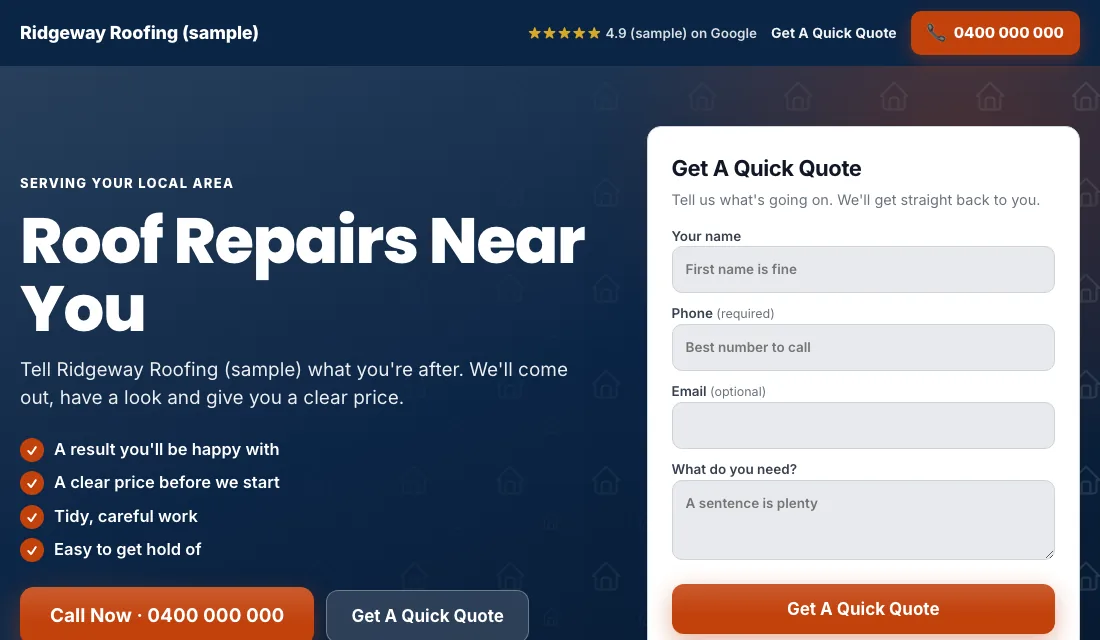
Track every roofing lead before the first ad
Google bids toward the results it can see. If it can't see which clicks became quote requests, it goes after cheap clicks, and cheap roofing clicks are people reading about shingles. Tracking is the first job.
A conversion is an action you want from a click. For a roofer that is a phone call or a quote form.
- In Google Ads, go to Goals, then Conversions, and create a conversion action.
- Make one for calls from your ads and one for calls from your website. Give them a minimum call length, so hang-ups don't count.
- Make one for your quote form, counted when the form is sent.
- Set those as primary. Primary means bidding uses them. Set anything else, such as page views, as secondary.
- Call from an ad and submit the form yourself. Check both show up within a day.
Then keep a list of leads outside Google Ads. Note the job type, whether you could quote it, whether it was signed, and the value. A roof replacement can be worth many small repairs, and Google can't tell them apart unless you do. Once leads are steady, upload the quoted and signed ones so bidding learns from real jobs.
Three account settings that waste roofing money
Fix these before you write a word of ad copy.
- Search only. Open your campaign's Networks setting. Untick Search Partners and the Display Network. Your ad should show on Google Search to someone typing "roof leak repair", nowhere else.
- People in your service area. In Locations, add the cities or zip codes you will drive to for a quote. In Location options, choose "Presence: people in or regularly in your included locations". The default includes people who merely show interest in your area, and you can end up quoting a roof two hours away.
- Auto-apply off. Go to Recommendations, open Auto-apply and turn off every box. If you leave it on, Google can add keywords and change your bidding without asking.
Set an ad schedule to match when you answer the phone. A homeowner with water coming through the ceiling calls the next roofer if you don't pick up.
How to structure a roofing campaign
A campaign holds ad groups. An ad group is a set of keywords that share the same ads. Use one ad group per job and one landing page per ad group.
| Ad group | Example searches | Landing page |
|---|---|---|
| Leak repairs | roof leak repair, roof repair near me | Your leak repair page |
| Roof replacement | roof replacement, new roof cost quote | Your replacement page |
| Hail and storm damage | hail damage roof repair, storm damage roofer | Your storm damage page |
| Gutter replacement | gutter replacement, gutter installation | Your gutter page |
| Roof restoration | roof restoration, roof coating company | Your restoration page |
The mistake seen most often is a single ad group with every roofing word in it and all clicks sent to the home page. A person searching for gutters sees a re-roof ad. They click less, the click costs more, and the page doesn't answer them.
Only build ad groups for the work you want. If you don't do commercial flat roofs, metal roofing or solar mounting, leave them out and block them in the next step but one.
Keywords a homeowner types when they need a roofer
A keyword is the phrase you give Google. A search term is what a person typed. Your job is to keep the two close.
Ready-to-hire roofing searches name the problem or the job:
- roofer near me
- roof leak repair
- roof replacement in your city
- hail damage roof repair
- gutter replacement near me
- roofing company near me
Add a few with your city or county in them. Keep each ad group to a short list of phrases about that one job.
Match types set how loosely Google matches:
- Exact match shows your ad for that search or one that means the same.
- Phrase match shows your ad when the search contains the meaning of your phrase, with extra words around it.
- Broad match shows your ad for anything Google thinks is related. Leave it off for now.
Begin with phrase and exact match. Each week, look for search terms that led to a signed job. Add those as exact match keywords in the matching ad group. After the next storm, you will already be bidding on the searches that paid last time.
Roofing searches to block from day one
A negative keyword is a search you refuse to pay for. After a storm everyone with a roof is on Google, and plenty of them will never hire anyone. Add these at the account level before you launch:
- Job seekers: jobs, hiring, salary, careers, apprenticeship.
- Students: course, training, school, certification.
- DIY: how to, diy, video, sealant, tar, patch kit.
- Shoppers: supplies, shingles for sale, nails, nailer, underlayment, wholesale.
- Not roofing at all: racks, rack, tent, cargo box.
- Other roofers' names: a person searching a company by name has usually decided.
Add each as a phrase match negative trimmed to its core word. Block "apprenticeship", not "roofing apprenticeship near me". For work you don't do, add those words too, such as "high rise", "commercial" or "solar".
Then run the search-term check. Daily or every second day for two weeks, and weekly after that:
- Open the search terms report under Insights and reports.
- Sort by cost, highest first.
- Ask of each search: do I want that call?
- If not, block the core word.
In storm week, do this check every day. The volume is high and the junk rises with it.
Writing ads for a roofing company
A responsive search ad holds up to 15 headlines and 4 descriptions. Google combines them, so give it plenty to work with.
- Say the job: "Roof Leak Repair", "Hail Damage? Free Roof Inspection" if you offer one.
- Say the place: your city or "Near You".
- Say why you: licensed and insured, written warranty, local crew, help with the insurance claim paperwork. Claim only what is true.
- Say the next step: "Call today for a quote."
Write one ad per ad group about that one job. A replacement ad can talk about materials and warranty. A leak ad should talk about speed.
Add the extras, which Google calls assets:
- Call asset: your number on the ad, so a phone user can tap to call.
- Sitelinks: four or more extra links, such as "Get a Quote", "Storm Damage", "Our Work" and "Reviews".
- Callouts: short phrases like "Licensed and Insured" or "Written Warranty".
After a few weeks, write a second ad for each ad group and let the two compete.
The landing page for each roofing job
The landing page is where the click arrives. One per ad group, and each should pass this list:
- The headline matches the search. A gutter replacement ad lands on a gutter replacement page.
- The phone number is at the top and tapping it starts a call.
- A short quote form shows without scrolling: name, phone, address, and what is wrong with the roof.
- Before and after photos of your own jobs. A roof is a big purchase and people want to see your work.
- Real reviews near the top.
- No menu and no links leading away.
- Quick to load on a phone. A homeowner standing under a drip is on a phone.
Google scores how well keyword, ad and page match. A higher score gets you the same position for less money, which matters most in the expensive weeks after a storm.
Budget and bidding for a roofing account
Work out the budget from your own numbers: the leads you need in a month times what you can afford to pay for one. Fund it for at least two months. Roofing sales are slow, and a month of data tells you little.
Then bid in this order:
- Maximize Conversions from the start. With tracking working, Google bids toward calls and forms. Give it two or three weeks before judging.
- A fallback if nothing spends. Some brand-new accounts don't get going because they have no history. Switch to Maximize Clicks with a cap on the bid for each click, then return to Maximize Conversions as soon as leads come in.
- Target cost per lead. After about 30 conversions in 30 days, you can set a Target CPA, which is a target cost per lead. Put it 15 to 20 percent above what a lead has been costing. A target that is too low makes Google stop spending. Bring it down a little each month while leads keep arriving.
Skip manual bidding. And don't react to one week, least of all a storm week, which looks like nothing else in the year.
How to run Google Ads for roofers: the weekly and monthly checklist
Weekly:
- Review search terms and block the junk.
- Add searches that became signed jobs as exact match keywords.
- Update your lead list: quoted, signed or junk, with the job type.
- Return missed calls the same day.
Monthly:
- Check cost per lead and cost per signed job by ad group.
- Pause any ad group that spends and never signs.
- Make a test call and a test form.
- Check the pages load and the number is right.
- Decide whether the budget should move between repairs and replacements.
Storm week and the slow months
Roofing demand follows the weather more than the calendar.
- After hail or high wind: leak and storm damage searches spike the next morning. Have those ad groups built and paused, or running on a small budget, before the season starts. Building them the day after the storm is too late.
- Spring and fall: planned work. Roof replacements and restorations are quoted in mild weather. Shift budget toward those ad groups.
- Heavy rain: leaks and overflowing gutters. Gutter replacement searches rise with the first long wet spell.
- Deep winter or peak heat: slower for replacements. Keep repairs running and use the quiet time to tidy the account and get new photos onto your pages.
Or let software keep the account tidy
You now know how to run Google Ads for roofers yourself: track every lead, lock down the settings, keep one job per ad group, block junk every week, and move your bidding up as data builds. It works when you keep at it, and storm week is exactly when you have the least time.
Local Service Ads AI does this work every day and asks before it changes anything, unless you tell it to go ahead. See Google Ads for roofers.