First job: count every quote request
A conversion is the thing you want a click to turn into. For a removalist that is a phone call or a quote form. Google's bidding chases whatever you count, so if you count nothing, it buys whatever clicks cost least, and those are people shopping for boxes.
- In Google Ads, open Goals, then Conversions, and make a new conversion action.
- Add calls from ads and calls from your website. Set a minimum call length so a wrong number is not counted as a lead.
- Add your quote form. It must count when the form is sent, not when someone only opens the page.
- Mark calls and forms as primary, which means bidding uses them. Mark everything else secondary.
- Ring your own number from an ad and send a test quote request. Both should appear in Google Ads within a day.
Now keep a lead list. For each call or form, write down the kind of move, whether you could quote it, whether it booked, and what it was worth. A three-bedroom interstate move and a student with two suitcases are each "one lead" to Google. Your list is how you tell them apart. Later, when volume is steady, you can upload the quoted and booked leads so Google bids toward real moves.
Settings that stop a moving budget leaking
Do these three before any ad is written.
- Search only. In campaign settings, open Networks and untick Search Partners and the Display Network. You want to appear on Google Search when someone types "removalists near me", not on other sites.
- People who are in your area. Under Locations, add the cities or zip codes you pick up from. Open Location options and choose "Presence: people in or regularly in your included locations". The default setting also reaches people who are only reading about your city. For a removalist that sounds tempting, because people do move in from elsewhere. But most of those clicks are not bookings. If you want inbound interstate work, run it as its own campaign later.
- Auto-apply off. Open Recommendations, then Auto-apply, and switch off every box. Otherwise Google can add loose keywords such as "moving truck" on its own.
Set the ad schedule to the hours someone answers the phone and can talk through a quote. People plan moves in the evening and on weekends, so if you can take those calls, keep the ads on then.
One ad group for each kind of move
An ad group is a small set of keywords that share the same ads. Give each kind of move its own ad group, and give each ad group its own landing page.
| Ad group | Example searches | Landing page |
|---|---|---|
| Local house moves | removalists near me, local removalists | Your local moves page |
| Interstate moves | interstate removalists, long distance movers | Your interstate page |
| Office moves | office removalists, office relocation company | Your office moves page |
| Piano moves | piano removalists, piano movers near me | Your piano page |
| Packing | packing service, removalists and packers | Your packing page |
The usual mistake is one ad group with every moving keyword in it, all pointing at the home page. Then someone moving a piano sees an ad about office relocations and clicks away.
Put interstate and office moves in their own campaigns if you can, because a campaign is where the budget is set. A long haul is worth more than a one-room local job, and you don't want the two fighting over the same daily budget.
Leave out anything you don't do. If you never go overseas or don't offer storage, don't build an ad group for it.
Keywords a customer types when the move date is set
A keyword is the phrase you ask Google to match. A search term is what the person really typed. The two are never quite the same, and the gap is where the waste hides.
People who are ready to book name the move, and often the place:
- removalists near me
- interstate removalists
- furniture removalists in your city
- office removalists
- piano removalists
- two men and a truck
Keep each ad group to a handful of close phrases. Add your city or neighborhoods to some of them.
Match types control how loosely Google matches:
- Exact match shows the ad for that search, or one that means the same thing.
- Phrase match shows the ad when the search contains the meaning of your phrase, with other words around it.
- Broad match shows the ad for anything Google decides is related. For a removalist that pulls in truck rental and storage units. Leave it off.
Start on phrase and exact. Each week, find the search terms that led to a booked move and add them as exact match keywords in the right ad group. After a few months the account is built from searches that have already paid you.
Searches a removalist should block before the first click
A negative keyword is a word you tell Google never to show your ad for. Add these at the account level on day one:
- Job seekers: jobs, wages, salary, hiring, careers, driver wanted.
- Do-it-yourself movers: how to, diy, tips, checklist, truck rental, van rental, trailer.
- Shoppers: boxes, packing tape, bubble wrap, dolly, blankets for sale.
- Things you may not offer: storage, international, container, car transport. Only block the ones you really don't do.
- Other companies' names: someone searching a competitor by name has usually chosen.
Add each as a phrase match negative, cut down to its core word. Block "rental", not "cheap moving truck rental one way". The short word catches every version. One caution: if you sell boxes or packing materials with a move, don't block "boxes" outright. Watch what those searches do first.
Then check the search terms. For the first two weeks, look every day or two. After that, weekly:
- Open the search terms report under Insights and reports.
- Sort by cost, with the most expensive at the top.
- For each one, ask whether you would want that phone call.
- If not, block the core word.
Ads that say the move and the place
A responsive search ad takes up to 15 headlines and 4 descriptions, and Google mixes them. Fill in as many as you honestly can.
- Name the move: "Interstate Removalists", "Piano Moves Done With Care".
- Name the place: your city, or "Near You".
- Give a reason to call: insured, fixed quotes, same crew from start to finish, no hidden fees. Claim only what is true.
- Tell them the next step: "Get a quote today."
Write a separate ad for each ad group. An office ad should talk about moving after hours and getting desks back in place by Monday. A local ad should talk about careful handling and turning up on time.
Then add the extras, called assets. They make the ad bigger for no extra cost per click:
- Call asset: your number on the ad, so someone on a phone can tap it.
- Sitelinks: at least four extra links, such as "Get a Quote", "Interstate Moves", "Packing Service" and "Reviews".
- Callouts: short phrases like "Fully Insured" or "Weekend Moves".
A landing page for each move
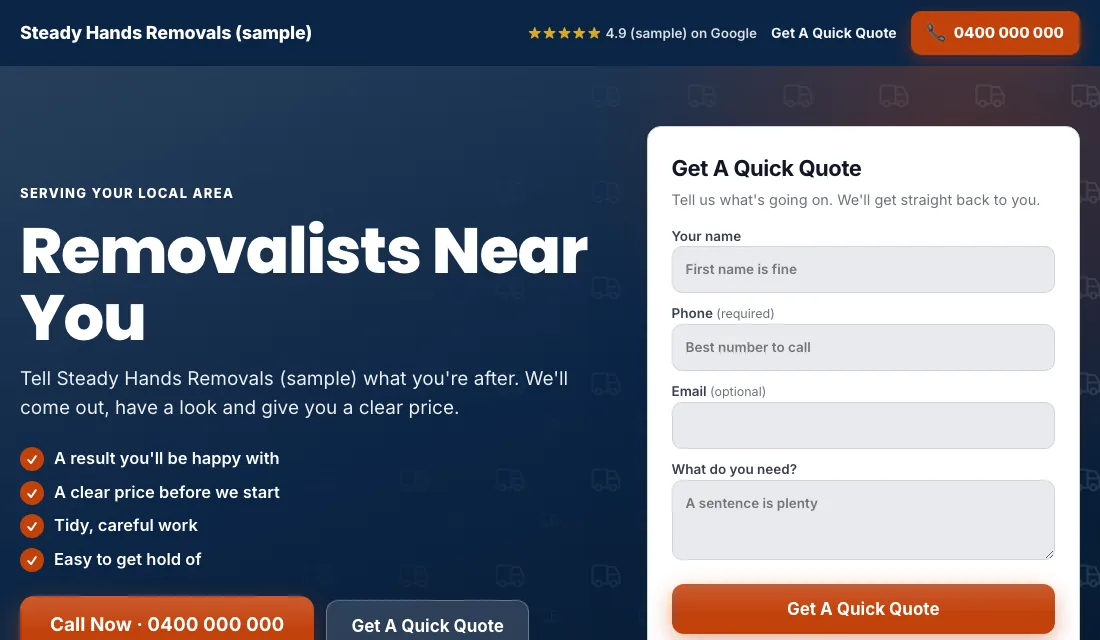
The page a click lands on decides whether you get the quote request. Build one page per ad group and check each one:
- The headline repeats the search. An "office removalists" ad lands on a page headed office moves.
- The phone number is at the top and starts a call when tapped.
- The quote form sits where it can be seen without scrolling. Ask for name, phone, the two addresses, the move date and the home size. Those fields help you price it and screen out browsers.
- Real photos of your trucks and crew, wrapped furniture, a piano on a trolley. No stock pictures.
- Real reviews near the top, ideally ones that mention the kind of move.
- No menu and no links away from the page.
- Fast and easy to read on a phone.
Google gives each keyword a score for how well the keyword, ad and page match. A better score means you pay less for the same spot.
Budget and bidding for moving work
Set the budget from your own figures. Decide how many quote requests you need each month and what you can pay for one, and multiply. Fund it for a couple of months so Google has time to learn.
Then bid in stages:
- Start on Maximize Conversions. Once calls and forms are counted, let Google bid toward them. Give it two to three weeks before you form a view.
- If the account won't spend. A brand-new account can sit idle because it has no history. In that case switch to Maximize Clicks with a cap on what you pay per click, and move back to Maximize Conversions once leads arrive.
- Set a target cost per lead. After about 30 conversions in 30 days, you can use Target CPA, which is a target cost per lead. Set it 15 to 20 percent above what a lead has really been costing. Too tight a target makes Google stop showing your ads. Lower it a little each month while the leads hold up.
Don't use manual bidding, and don't change bids after one slow week. Moving demand swings by the week of the month, so compare month with month.
How to run Google Ads for removalists each week and month
Each week:
- Read the search terms and block the junk.
- Add searches that became booked moves as exact match keywords.
- Mark each lead as quoted, booked or junk, with the kind of move.
- Call back missed calls quickly. People ask two or three removalists, and the first to answer often gets the job.
Each month:
- Compare cost per lead and cost per booked move for each ad group.
- Pause an ad group that has spent real money and booked nothing.
- Test a call and a form to be sure tracking still works.
- Check each page loads and shows the right number.
- Look at whether the budget split between local and interstate still makes sense.
Peaks and quiet weeks in the moving year
Moving has a rhythm you can plan for.
- End of the month: leases end and everyone wants the same Saturday. People search one to three weeks ahead, so the ads need to be on mid-month, not only on the last weekend.
- Summer: families move when school is out. Interstate searches rise ahead of it.
- Winter and mid-month weekdays: the quiet time. This is when a steady ad budget fills empty truck days. Some owners offer a weekday rate and say so in the ad.
- Start of the school and college year: small moves and student moves. Decide whether you want them, and block "student" if you don't.
When you are booked solid for a week, lower the budget for local moves and keep interstate running, since those are booked further ahead.
Or hand the whole routine to software
That is how to run Google Ads for removalists by hand: count every quote request, lock the three settings, give each kind of move its own ad group and page, block the junk each week, and step your bidding up as leads build. It works, and it takes an hour or two every week.
If you would sooner be on the truck, Local Service Ads AI does these checks every day and waits for your OK before anything changes, unless you tell it to go ahead. See Google Ads for removalists.