Tracking first: calls, forms and which ones booked
Google's bidding goes where the numbers point. If it can't see which clicks became calls, it buys clicks from people reading about ant bait.
A conversion is the action you want from a click. For pest control, that is a phone call or a quote form.
- In Google Ads, open Goals, then Conversions, and create a new conversion action.
- Add one for calls from your ads and one for calls from your website. Set a minimum call length, so quick wrong numbers are left out.
- Add one for your quote or booking form, counted when it is sent.
- Mark these as primary, meaning bidding uses them. Mark anything else as secondary.
- Make a test call and send a test form. Check both appear in Google Ads within a day.
Then keep a list of every lead and what became of it. Quoted or not, booked or not, one visit or a recurring plan, and the value. A termite treatment and a caller asking which spray to buy are both "one call" to Google. Once volume is steady, upload the quoted and booked leads to Google Ads so bidding learns from real jobs.
Account settings a pest control company should fix first
Three settings, five minutes, a lot of money saved.
- Search only. In campaign settings, open Networks. Untick Search Partners and untick the Display Network. Your ad belongs on Google Search when someone types "exterminator near me".
- People who are in your service area. Open Locations and add the cities or zip codes your technicians cover. Then open Location options and choose "Presence: people in or regularly in your included locations". The default also includes people who only showed interest in the area.
- Auto-apply off. Open Recommendations, find Auto-apply and turn off every box. Otherwise Google can add keywords and change bidding by itself.
Set the ad schedule to the hours someone answers. A homeowner who just saw a rat wants to talk to a person now. If nobody picks up, they call the next company.
How to structure the campaign: one pest per ad group
An ad group is a set of keywords that share the same ads. In pest control, the rule is one pest per ad group, with its own landing page. A termite search should never see a spider ad.
| Ad group | Example searches | Landing page |
|---|---|---|
| Termites | termite treatment, termite inspection | Your termite page |
| Rodents | rat exterminator, mice removal | Your rodent page |
| Ants | ant exterminator, carpenter ant treatment | Your ant page |
| Bed bugs | bed bug exterminator, bed bug treatment | Your bed bug page |
| Wasps and hornets | wasp nest removal, hornet removal | Your wasp page |
| Roaches | cockroach exterminator, roach control | Your roach page |
| Spiders | spider control, spider exterminator | Your spider page |
| Mosquitoes | mosquito control, mosquito yard treatment | Your mosquito page |
| General | pest control near me, exterminator near me | Your main pest control page |
Build the ones you treat and want. Termite work is often a different sale, with an inspection and a larger job, so many companies put it in its own campaign with its own budget.
Keywords someone with a live problem types
A keyword is the phrase you give Google. A search term is what the person typed. You pay for the search term.
A ready-to-hire search pairs the pest with a service word, such as exterminator, control, removal, treatment or inspection:
- pest control near me
- exterminator near me
- termite inspection
- rat exterminator
- bed bug treatment
- wasp nest removal
The service word matters. "Ants in kitchen" is a question. "Ant exterminator" is a customer.
Add your city to a few, and keep each ad group short.
Match types set how loosely Google matches:
- Exact match shows your ad for that search or one that means the same.
- Phrase match shows your ad when the search contains the meaning of your phrase, with words around it.
- Broad match shows your ad for anything Google considers related. Leave it off for now.
Begin with phrase and exact match. Each week, see which search terms became booked jobs and add them as exact match keywords in the right ad group.
Searches a pest control company should block from day one
A negative keyword is a search word you block. Add these at the account level before the first click:
- DIY: how to, diy, homemade, home remedy, natural, get rid of.
- Product shoppers: spray, bait, trap, killer, repellent, powder, for sale, and the names of hardware stores near you.
- Job seekers: jobs, hiring, salary, careers.
- License and study: license, certification, course, training, exam.
- Curiosity: pictures, what do, identify, bite, life cycle.
- Pests you don't treat: for example wildlife, raccoon, bat, snake, bee.
- Other pest companies' names.
"Get rid of" is the big one. It is how nearly every DIY pest search starts. Some customers type it too, so watch your search terms for a few weeks. If "get rid of" searches are booking, take it back off the list.
Add each as a phrase match negative, cut to its core word.
Then check the search terms. Every day or two for the first two weeks, weekly after that:
- Open the search terms report under Insights and reports.
- Sort by cost, highest first.
- Ask of each search: would I send a technician to that?
- If not, block the core word.
Writing pest control ads
A responsive search ad takes up to 15 headlines and 4 descriptions. Google mixes them. Use as many as you can.
- Name the pest and the service: "Termite Inspections", "Rat Exterminator".
- Name the area: your city, or "Near You".
- Give true reasons to call: licensed technicians, same-day or next-day visits, safe around children and pets, a guarantee if you offer one.
- End each description with the next step: "Call now for a free quote."
Each ad group gets its own ad about that pest. After a few weeks, add a second ad and let them compete.
Then add the extras, called assets:
- Call asset: your number on the ad for tap to call.
- Sitelinks: at least four, such as "Termite Inspections", "Rodent Control", "Get a Quote" and "Reviews".
- Callouts: short phrases such as "Licensed and Insured", "Pet-Friendly Treatments" and "Follow-Up Visit Included", if true.
A landing page for each pest
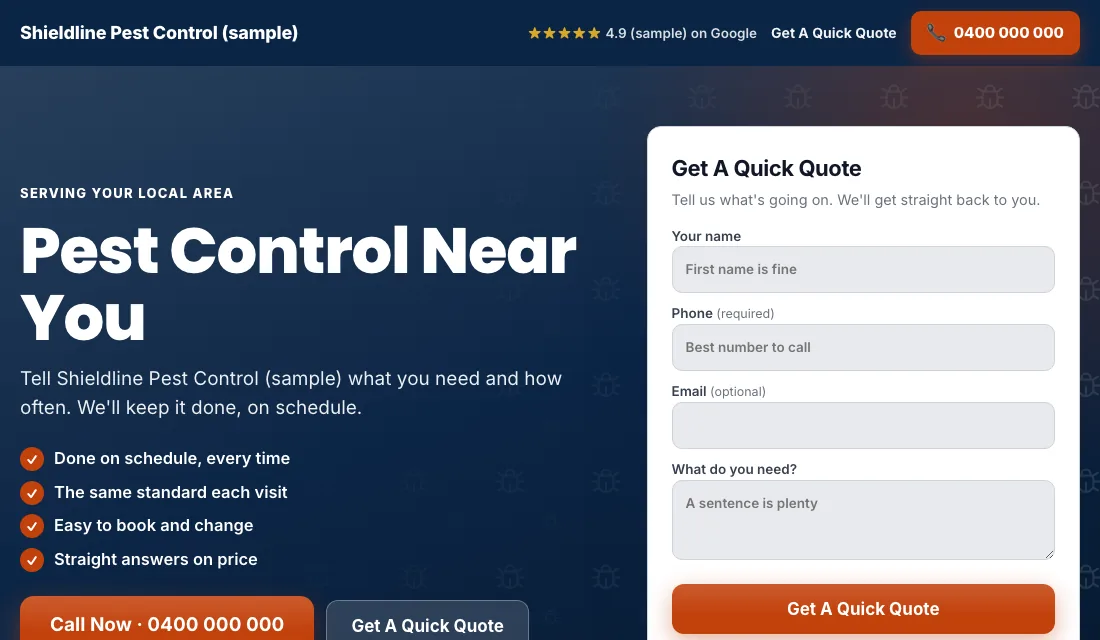
Someone who searched "bed bug treatment" is upset and wants to know you handle bed bugs. Give them a page about exactly that.
- The headline matches the search. A "termite inspection" ad lands on a page headed termite inspection.
- Phone number at the top, tap to call.
- A short form near the top: name, phone, address and the pest.
- What the visit involves, in a few lines: inspect, treat, follow up.
- Real photos of your technicians and trucks. Go easy on close-ups of the pest.
- Reviews near the top.
- No menu and no links leading away.
- Fast on a phone.
Google scores how well the keyword, ad and page match. A close match gets a higher score, and that lowers what you pay for the same spot.
Budget and bidding through the pest seasons
Set the budget from your numbers. How many new customers do you want each month, and what can you pay for a lead? Remember that a customer on a quarterly plan is worth more than one visit. Multiply, and fund it for a couple of months.
Bidding moves in stages:
- Maximize Conversions from the start. With tracking working, launch on this setting. Google bids toward calls and forms. Give it two or three weeks.
- If a new account won't spend. Use Maximize Clicks with a cap on the bid per click as a fallback, and go back to Maximize Conversions once leads come in.
- A target cost per lead. After about 30 conversions in 30 days, set a target, which Google calls Target CPA. Start 15 to 20 percent above what a lead has been costing. Too tight and Google stops spending. Lower it a little each month while leads hold.
Never bid by hand. Don't change bids or budgets after one slow week, since pest calls swing with the weather.
How to run Google Ads for pest control: a weekly and monthly routine
Every week:
- Check the search terms and block DIY, product and job searches.
- Add searches that became jobs as exact match keywords.
- Mark each lead: quoted, booked, recurring or junk.
- Check missed calls and call them back.
Every month:
- Compare cost per lead and cost per booked job, pest by pest.
- Pause an ad group that spends and never books.
- Move budget toward the pests coming into season.
- Test the phone number and the form.
- Review the bidding stage.
Pest seasons and when to move the budget
Pests follow the weather, and the searches follow the pests.
- Spring: termite swarms, ants and the first wasps. Have those ad groups live before the first warm week.
- Summer: wasps, hornets, mosquitoes, roaches and bed bugs after travel.
- Fall: rodents move indoors as it cools. Spiders too.
- Winter: rodents carry on. Other pests go quiet in cold regions.
- All year: inspections for home sales come whenever houses sell.
Seasons shift by region, so trust your own call log from last year over any calendar.
Or have software do all of this
That is how to run Google Ads for pest control by hand: count every lead, lock the settings, give each pest its own ad group and page, block the DIY searches every week, and step the bidding up as the data grows. It works, and it takes time each week.
If you would rather spend that time on the route, Local Service Ads AI does these steps every morning and sends you one plain email. Each change waits for your OK unless you tell it not to. See Google Ads for pest control.