Before tax season: count every call and inquiry
Google bids toward whatever you tell it is a result. If it can't see which clicks became inquiries, it chases cheap clicks, and cheap tax clicks are mostly people looking for a calculator. So set up tracking before you spend anything.
A conversion is the action you want after an ad click. For an accounting practice that is a phone call or an inquiry form.
- In Google Ads, open Goals, then Conversions, and create a new conversion action.
- Add one for calls from your ads and one for calls from your website. Set a minimum call length so a wrong number is not counted as a lead.
- Add one for your inquiry form. It should count when the form is sent, not when someone opens the page.
- Mark those as primary, which means bidding uses them. Mark everything else as secondary. A click on "Our Team" is not a lead.
- Make a test call and send a test form. Check that both appear in Google Ads within a day.
Then keep a plain list of every lead. For each one, note three things: was it a real inquiry you could quote, did they sign, and what is the client worth in a year? A freelancer two years behind on returns and a student asking about a CPA course both look like "one call" to Google. Once you have steady volume, you can upload the quoted and signed leads so bidding learns from clients, not from rings.
Account settings that protect an accounting firm's budget
Three settings do more damage than any keyword. Set them before you write an ad.
- Search only. In campaign settings, open Networks. Untick Search Partners and untick the Display Network. You want your ad on Google Search, in front of someone typing "tax accountant near me".
- People in your area. Open Locations and add the cities or zip codes you serve. Then open Location options and choose "Presence: people in or regularly in your included locations". The default also includes people who are only interested in your area, and that pulls in searches from anywhere.
- Auto-apply off. Open Recommendations, find Auto-apply, and turn every box off. Left on, Google can add loose keywords and change your bidding without asking.
Set the ad schedule to the hours someone answers the phone. An inquiry that reaches voicemail on April 10 calls the next firm on the list.
How to run Google Ads for accountants with one service per ad group
An ad group is a set of keywords that share the same ads. The rule is one service per ad group and one landing page per ad group. A person who needs payroll and a person who is behind on returns are not asking the same question, so they should not see the same ad.
For an accounting practice, the ad groups usually look like this:
| Ad group | Example searches | Landing page |
|---|---|---|
| Individual tax returns | tax preparer near me, tax return accountant | Your personal tax page |
| Self-employed and freelancer returns | self employed tax return, accountant for freelancers | Your self-employed page |
| Small business tax | small business accountant, business tax preparation | Your business tax page |
| Bookkeeping | bookkeeping services, monthly bookkeeper | Your bookkeeping page |
| Payroll | payroll services for small business | Your payroll page |
| Late and back taxes | file back taxes, unfiled tax returns help | Your late returns page |
Only build ad groups for work you want. If simple one-form returns don't pay for your time, leave that ad group out and put the money into business clients.
Many firms split tax and bookkeeping into two campaigns so each has its own budget. Tax needs a big budget for a few months. Bookkeeping and payroll need a small steady one all year.
Keywords: what a ready-to-hire client types
A keyword is the phrase you ask Google to match. A search term is what the person really typed. The gap between the two is where money leaks.
Ready-to-hire searches for an accountant name the service, and often the place or the kind of client:
- tax accountant near me
- cpa for small business
- self employed tax return accountant
- bookkeeping services
- file back taxes help
Add your city to a few of them. Keep each ad group to a short list of close phrases.
Match types tell Google how loosely to match:
- Exact match shows your ad only for that search or one with the same meaning.
- Phrase match shows your ad when the search includes the meaning of your phrase, with other words around it.
- Broad match shows your ad for anything Google thinks is related. For tax words, that includes refund trackers and software logins. Leave it alone for now.
Start with phrase and exact match. Each week, look at which search terms turned into signed clients, and add those as exact match keywords in the right ad group. By next tax season, the account already knows the searches that paid you this year.
Searches to block from day one
A negative keyword is a search you block. People type tax words all year for reasons that have nothing to do with hiring an accountant. Add these as account-level negatives before the first click:
- Doing it themselves: diy, how to, calculator, template, software, and the names of the tax software brands.
- Free help: free, volunteer.
- Job seekers: jobs, salary, hiring, careers, internship.
- Students: course, degree, exam, certification, class.
- Logins and trackers: login, sign in, refund status, where is my refund.
Add each one as a phrase match negative, trimmed to the core word. Block "salary", not "graduate accountant salary in my city". The short version catches every variation.
Then check the search terms. In the first two weeks, look every day or two. After that, once a week:
- Open the search terms report under Insights and reports.
- Sort by cost, highest first.
- For each search, ask: would I want that person as a client?
- If not, block its core word. If it is work you don't do, such as audits or estate planning, block that too.
In the weeks before the deadline, go back to checking every couple of days. Search volume jumps, and so does the junk.
Writing ads a taxpayer will call
A responsive search ad takes up to 15 headlines and 4 descriptions, and Google mixes them. Fill in as many as you can.
- Put the service in the headline: "Self-Employed Tax Returns", "Monthly Bookkeeping".
- Put the area in the headline: your city, or "Near You".
- Say what makes you worth the call: licensed, fixed fees quoted up front, years in practice, same-week appointments. Only claim what is true.
- Speak to the worry: "Behind on Returns? We Can Help."
- End every description with the next step: "Call for a fixed-fee quote."
Do not promise a refund amount or a result. Check your own regulator's advertising rules before the ads go live.
Each ad group gets an ad written about that one service. After a few weeks, write a second ad and let the two compete.
Then add the extras, which Google calls assets:
- Call asset: your phone number on the ad, so someone on a phone can tap to call.
- Sitelinks: extra links under the ad. Add at least four, such as "Book a Call", "Small Business Tax", "Bookkeeping" and "Client Reviews".
- Callouts: short phrases such as "Fixed Fees", "Licensed CPA" or "Year-Round Support".
The landing page: one service per page
The landing page decides whether a click becomes an inquiry. Build one per ad group and check each against this list:
- The headline matches the search. A "bookkeeping services" ad lands on a page that says bookkeeping services at the top.
- Your phone number is at the top, and tapping it on a phone starts a call.
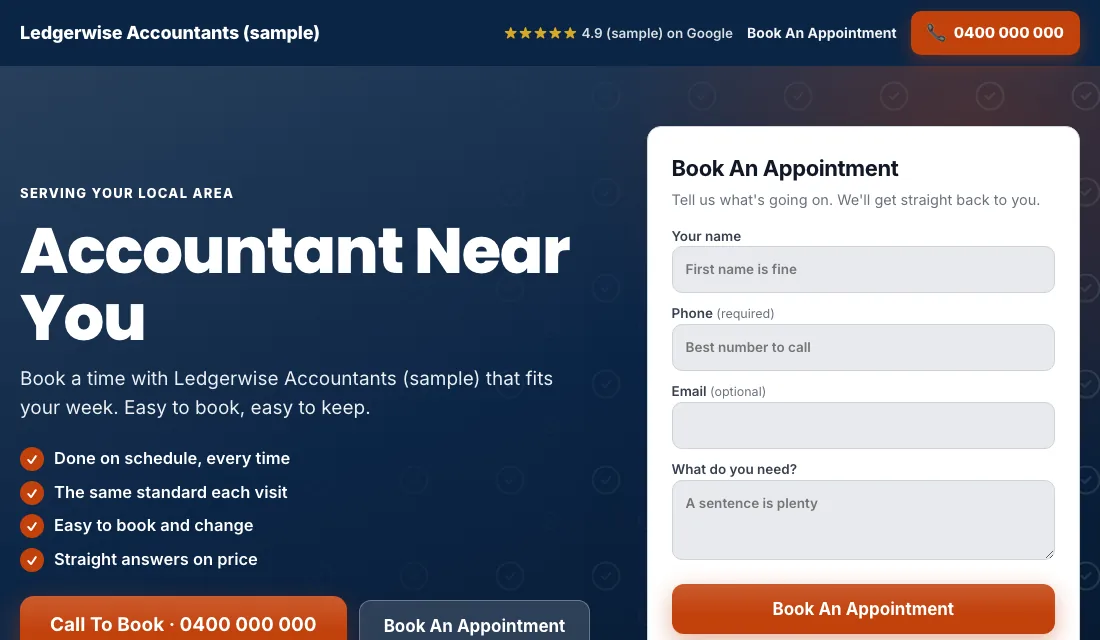
- A short inquiry form shows without scrolling: name, phone, email, and what they need. One extra question, such as "personal or business?", helps you sort inquiries.
- A real photo of you and your team. People hand an accountant their finances, so they want to see a face.
- Real reviews near the top.
- A plain line about how fees work, even if it is only "fixed fee, quoted before we start".
- No menu and no links that lead away.
- It loads fast and reads well on a phone.
Google scores how closely your keyword, ad and page match. A closer match earns a better score, and a better score means you pay less for the same position.
Budget and bidding through the year
Set the budget from your own numbers. How many new clients do you need, how many inquiries does it take to sign one, and what can you afford to pay for an inquiry? Multiply it out. A monthly bookkeeping client is worth far more than one return, so that ad group can afford a higher cost per lead.
Then move through the bidding stages as your data grows.
- Conversions from the start. With tracking working, start on Maximize Conversions. Google bids toward calls and forms, not just clicks. Give it two or three weeks before you judge it.
- If a new account won't spend. A brand-new account sometimes has too little history to get going. Switch to Maximize Clicks with a cap on what you pay per click, and move back to Maximize Conversions as soon as inquiries arrive.
- A target cost per lead. After about 30 conversions in 30 days, you can set a target cost per lead, which Google calls Target CPA. Set it 15 to 20 percent above what a lead has been costing. A target set too tight makes Google stop spending. Lower it a little each month while the inquiries keep coming.
Do not set bids by hand, and do not change bids or budgets on a week of data. The exception is the budget itself around tax season, which you raise and lower on purpose.
Your weekly and monthly checklist
Every week:
- Check the search terms and block the junk.
- Add searches that became clients as exact match keywords.
- Mark each lead in your list: quoted, signed or junk.
- Call back every missed inquiry the same day. In tax season, the first firm to call back usually gets the client.
Every month:
- Look at cost per inquiry and cost per signed client for each ad group.
- Pause an ad group that spends and never signs anyone.
- Make a test call and send a test form, in case tracking broke.
- Check that each landing page loads and shows this year's dates, not last year's.
- Review your bidding stage and your budget for the months ahead.
Seasons and timing for accountants
Accounting demand runs on a calendar, and you know the dates better than Google does.
- A month before filing opens: switch the tax campaigns on at a low budget. Use the quiet weeks to sort searches and fix pages.
- Filing season: in the United States this runs from late January to mid-April. Raise the tax budget as searches climb, and expect the last two weeks to be the busiest.
- After the deadline: lower the tax budget. Keep the late and back taxes ad group on, because people who missed the date are now searching for help.
- Extension deadline: a smaller second wave arrives in the weeks before extended returns are due.
- Year end and new year: business owners look for a new bookkeeper or payroll provider when a year closes. Give those ad groups more budget then.
- Quarterly dates: self-employed people search around estimated tax due dates.
Outside the United States, swap in your own filing dates. The pattern holds.
Or have software do all of this
That is how to run Google Ads for accountants by hand: track every inquiry, lock the settings, keep one service per ad group, block junk each week, and move your bidding up as the data grows. It works, and it asks the most of you in the weeks you have the least time.
If you would rather spend tax season on clients, Local Service Ads AI does these steps for you every day. Nothing changes without your OK unless you tell it to go ahead. See Google Ads for accountants.